

Employees connect from homes, branch locations, and remote environments, while critical applications and sensitive data increasingly move across cloud platforms and distributed infrastructure.
This shift has created a new challenge: organizations must provide seamless access to business resources without exposing internal systems to unnecessary security risks. A corporate VPN network remains one of the most widely used solutions for addressing this challenge.
This guide explains how corporate VPN networks work, when organizations need them, the different deployment approaches available, and the key factors businesses should evaluate before building a secure VPN environment.
What Is a Corporate VPN?
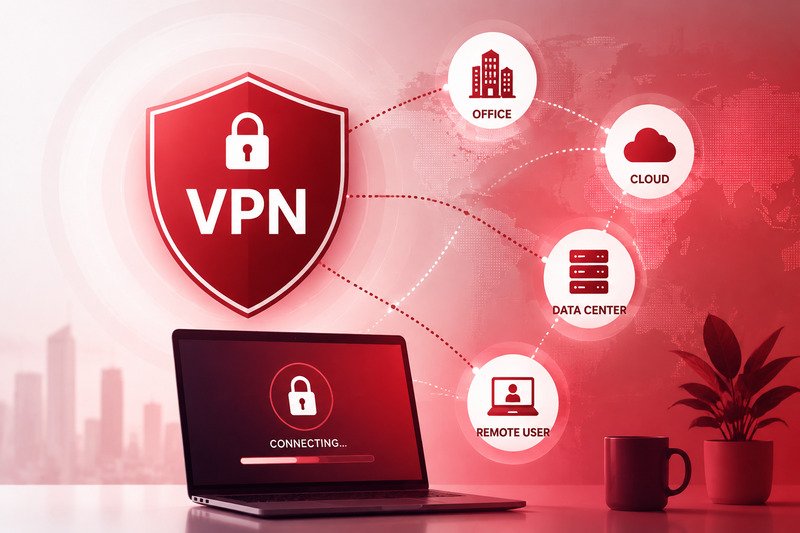
A corporate VPN, or virtual private network, creates an encrypted connection between authorized users and a company’s private network.
Think of it as a protected tunnel between an employee’s device and business resources. For example, an employee working from home may need access to:
- Internal dashboards
- Company databases
- File servers
- Development environments
- Accounting systems
- Customer management platforms
- Private cloud resources
Instead of exposing these systems directly to the public internet, a company can place them behind a private network. Employees then connect through the VPN before accessing them.
The VPN helps encrypt traffic while also allowing the company to control who can enter the network.
Corporate VPNs vs Consumer VPNs
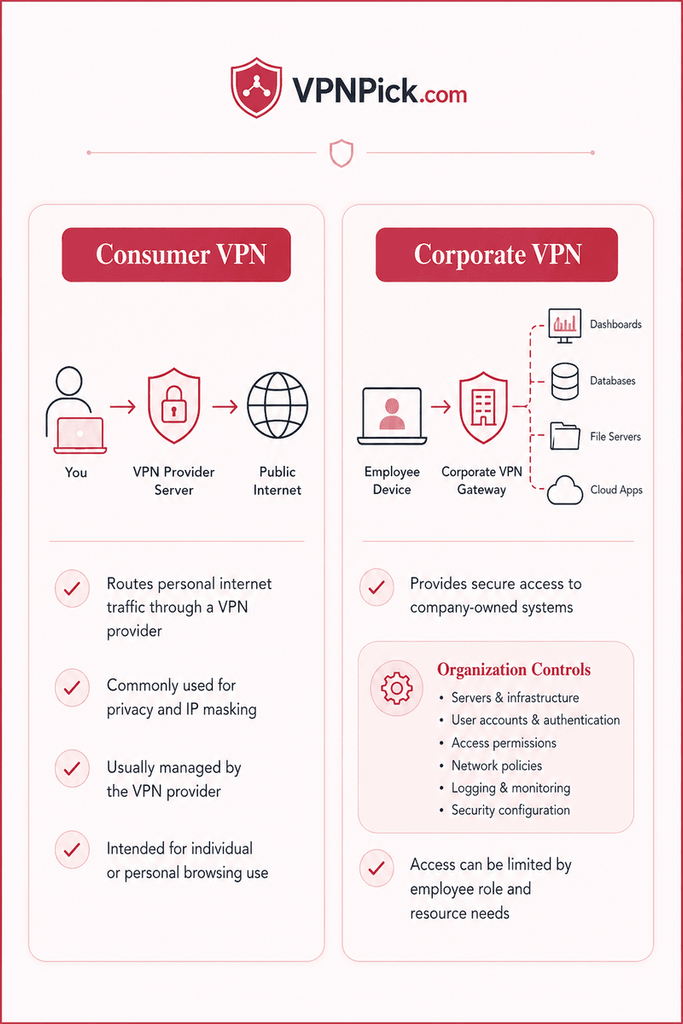
Corporate and consumer VPNs use similar networking concepts, but they serve different purposes.
A consumer VPN usually routes a person’s internet traffic through a VPN provider’s server. People commonly use these services for online privacy or changing their visible IP address.
A corporate VPN is different.
Its main purpose is to provide secure access to company-owned systems. With a business VPN, the organization usually controls:
- VPN servers
- User accounts
- Authentication rules
- Access permissions
- Network policies
- Logging
- Security configuration
The company can also decide which employees are allowed to access specific resources.
For example, a marketing employee may need access to shared files and analytics tools but not engineering servers. A developer may require access to testing environments but not payroll systems.
Thus, a properly designed corporate VPN can support these different access levels to ensure better work efficiency and transparency.
When Does a Business Need a Corporate VPN?
Not every organization needs the same network setup. However, several situations may make a corporate VPN useful.
Remote Employees
Remote employees often need access to systems that should not be available publicly.
A VPN allows staff members to connect to the company network from outside the office while keeping the connection encrypted.
This can be useful for businesses with fully remote teams as well as companies that allow employees to work from home a few days each week.
Multiple Office Locations
Companies with offices in different cities may need a secure way for those locations to communicate. A site-to-site VPN can connect entire office networks.
For example, a company’s headquarters in New York may host internal systems while employees in another office need regular access to them. Instead of treating each employee as an individual remote connection, the two office networks can communicate securely through the VPN.
Private Business Applications
Some applications should never be open to the entire internet. Businesses may operate internal tools such as:
- Inventory platforms
- Reporting dashboards
- Admin panels
- Internal websites
- Database management systems
A VPN can allow authorized employees to reach these systems without making them publicly accessible.
Third-Party Contractors
Businesses frequently work with consultants, developers, agencies, vendors, and other outside partners. These users may need temporary access to specific systems.
A well-designed VPN can provide controlled access without giving an outside contractor unrestricted entry into the company’s entire network.
The Main Types of Corporate VPN
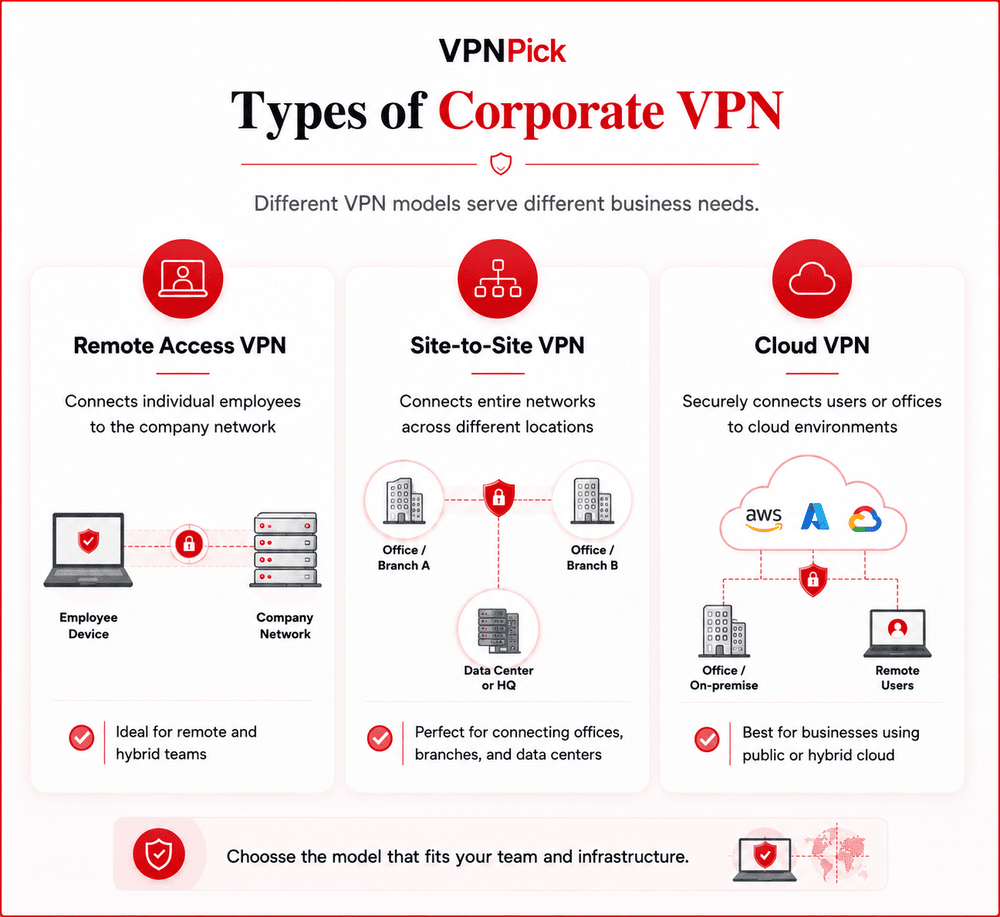
There are several ways to build a corporate VPN. The right approach depends on the business environment.
Remote Access VPN
A remote access VPN connects an individual device to the company network.
Employees usually install a VPN client on their laptop or another approved device. After authentication, the device connects to the corporate VPN server.
This model is common for remote and hybrid teams.
Site-to-Site VPN
A site-to-site VPN connects two or more networks rather than individual users. For example, a business might connect an office in one city with a data center or another branch office.
Employees inside those locations may not need to manually activate a VPN connection because the networking equipment handles the secure connection between sites.
Cloud VPN
Many companies now operate infrastructure on platforms such as AWS, Microsoft Azure, and Google Cloud.
A cloud VPN can securely connect company offices or remote users to private cloud environments.
Businesses may also combine cloud VPN infrastructure with traditional office networks, depending on where their applications and data are hosted.
Key Security Features to Consider
- A corporate VPN is only as secure as its configuration.
- Simply having a VPN does not automatically make a business network safe.
- Companies should evaluate several security controls before deployment.
Strong Encryption
VPN traffic should use modern encryption standards.
The protocol and configuration used by the organization can affect both security and performance. Older VPN technologies may still exist in legacy environments, but businesses should avoid outdated protocols with known weaknesses.
Multi-Factor Authentication
Passwords alone may not provide enough protection for important business systems.
Multi-factor authentication, commonly called MFA, requires users to provide an additional form of verification when signing in.
This could include an authentication application, security key, or another approved method.
Even if an attacker obtains an employee’s password, MFA can create another barrier to unauthorized access. CISA recommends multi-factor authentication as one of the most effective ways businesses can reduce the risk of account compromise.
Access Control
Not every employee should automatically have access to everything.
Companies should follow the principle of least privilege. This means giving users only the access they need to perform their jobs.
Permissions can be based on factors such as:
- Department
- Job role
- Project
- Location
- Device
- Security clearance
Careful access control can reduce the damage caused by compromised accounts or human error.
Device Security
A secure VPN connection cannot fully protect a company if the connecting device itself is compromised.
Businesses should consider whether devices connecting to the VPN have:
- Current operating system updates
- Antivirus or endpoint protection
- Strong login protection
- Disk encryption
- Approved software
- Security monitoring
Some organizations also restrict VPN access to company-managed devices.
Performance Matters Too
Security is important, but employees also need the network to work reliably.
A poorly designed VPN can cause slow connections, interrupted calls, delayed file transfers, or difficulty accessing cloud services.
Performance may depend on several factors.
Server Location
VPN servers should be located close enough to employees and company infrastructure to provide reasonable latency.
A business with employees across several regions may need more than one VPN gateway.
Available Bandwidth
The VPN infrastructure must handle expected traffic levels.
If hundreds of employees connect through a server designed for a much smaller team, network performance may suffer.
Businesses should consider current usage as well as future growth.
Full Tunneling vs Split Tunneling
With full tunneling, all internet traffic from a connected device travels through the corporate VPN.
This gives the company more control over traffic but can increase bandwidth requirements.
Split tunneling allows only traffic intended for company systems to pass through the VPN. Other internet activity goes through the user’s normal internet connection.
Both approaches have advantages and security considerations. The correct choice depends on company policies, applications, and risk levels.
Planning a Corporate VPN Deployment
Before deploying a VPN, businesses should map out what they actually need.
A basic planning process can prevent unnecessary complexity later.
Identify What Needs Protection
Start by identifying the systems employees need to access.
For example:
- Internal servers
- Cloud infrastructure
- Databases
- Business applications
- Development environments
- Shared storage
Avoid providing broad network access when employees only need a few specific resources.
Identify Who Needs Access
Create groups based on roles.
An organization might have separate access policies for:
- Executives
- IT administrators
- Developers
- Finance staff
- Sales teams
- Contractors
Role-based access is usually easier to manage than assigning permissions to every employee individually.
Choose the Infrastructure
The VPN may run on:
- Physical servers
- Virtual machines
- Cloud infrastructure
- Dedicated VPN appliances
- Managed network platforms
The right option depends on company size, technical resources, compliance needs, and existing infrastructure.
Select the VPN Technology
Businesses should compare available VPN technologies based on security, compatibility, ease of management, and performance.
There is no single protocol that is ideal for every organization.
For instance, WireGuard is known for its relatively simple design and strong performance, while IPsec remains common for site-to-site business connections. OpenVPN also continues to be widely used across different operating systems and networking environments.
Should a Business Build the VPN Internally?
Some companies have experienced networking and security teams capable of designing and maintaining their own VPN infrastructure.
For smaller organizations, however, building the entire system internally may be more difficult.
VPN deployment can involve firewall rules, routing, identity management, server security, encryption, monitoring, DNS configuration, cloud networking, and endpoint policies.
A mistake in one area can create security or reliability problems.
Businesses should realistically evaluate whether their internal IT team has enough networking expertise and time to maintain the environment.
For organizations that do not have dedicated networking expertise, working with a specialized provider can simplify the deployment process. Businesses looking for corporate vpn network setup services in locations such as New York or Philadelphia can consider working with experienced network specialists who can design private access solutions, configure VPN infrastructure, and align security controls with business requirements.
The important point is to evaluate the provider’s technical approach rather than choosing based only on price.
Questions to Ask a Corporate VPN Provider
If a business decides to use an outside provider, it should ask detailed questions before deployment.
Useful questions include:
- Which VPN technologies do you recommend and why?
- Where will the VPN infrastructure be hosted?
- Who will control the servers and configuration?
- Does the system support multi-factor authentication?
- Can access be restricted by employee role?
- How are employee accounts removed when someone leaves?
- How will VPN activity be monitored?
- What happens if the VPN server goes offline?
- Can the network support additional employees later?
- How are security updates handled?
- What documentation will the business receive?
A professional provider should be able to explain the proposed architecture in understandable terms.
Businesses should be cautious if a provider promises that a VPN alone will solve every cybersecurity problem.
It will not.
The Conclusion
A corporate VPN can give employees secure access to important business resources without exposing those resources directly to the public internet.
But successful deployment requires more than choosing a VPN software.
Businesses need to think about authentication, access permissions, encryption, network architecture, employee devices, server capacity, monitoring, and ongoing maintenance.
The best corporate VPN is the system that provides the required level of access while keeping unnecessary exposure to a minimum.
Before deploying a VPN, businesses should clearly identify who needs access, what they need to reach, and how those connections will be protected.