

Well, it comes down to three moving parts working together:
- Encryption
- Tunneling
- Servers
Once you understand how these three fit together, every other VPN feature, including the kill switch, protocol choices, and server locations, starts to make a lot more sense.
How Does a VPN Actually Work?
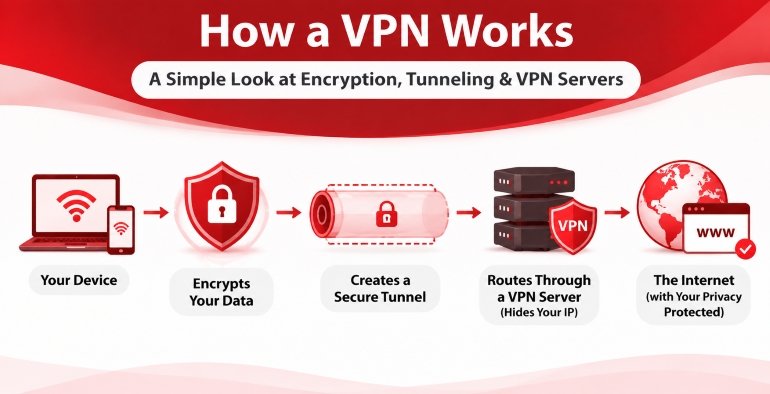
At a basic level, a VPN does three things at once:
- Encrypts your data so it’s unreadable to anyone who intercepts it.
- Tunnels that encrypted data through a private, wrapped connection.
- Routes it through a VPN server, which uses its own public IP address instead of your real IP address when forwarding your traffic to the internet.
Let’s break down each stage.
1. Encryption: Scrambling the Data

Image by Markus Winkler from Pexels
Your VPN app encrypts outgoing data using the cryptographic algorithms supported by its chosen protocol. Many VPN services support AES-256 (widely adopted), while WireGuard uses ChaCha20-Poly1305. These algorithms transform your original data into an unreadable format that can only be understood using the correct cryptographic keys.
Your VPN app and the VPN server establish shared encryption keys during the connection handshake. Your device uses these keys to encrypt outgoing traffic, while the VPN server uses the corresponding keys to decrypt it when the data arrives.
This matters most on networks you don’t control, for instance, coffee shop Wi-Fi, airport hotspots, hotel routers, etc. Public Wi-Fi networks can expose your internet activity to local network observers, particularly when connections are poorly secured.
HTTPS already encrypts data between your browser and supported websites, but a VPN adds a separate encrypted tunnel between your device and the VPN server. This helps prevent your local network operator and other network observers from directly inspecting your traffic.
2. Tunneling: Wrapping the Connection

Image by Manuel Joseph from Pexels
Encryption alone isn’t enough, so the data needs a “protected tunnel ” to travel through. That’s “tunneling” in technical terms.
Your VPN app encapsulates encrypted data packets inside other packets. This process allows them to travel through the VPN connection without exposing their original contents to the local network. The outer packet contains the information needed to route traffic to the VPN server.
The tunnel is built using a VPN protocol: a set of rules both your device and the VPN server agree to follow. Common ones include:
- OpenVPN: Long-standing, highly configurable, widely audited
- WireGuard: A modern, lightweight protocol designed for simplicity and performance.
- IKEv2/IPsec: Strong for mobile devices since it reconnects quickly after network switches
Different protocols trade off speed and compatibility, which is part of why VPN apps let you switch between them.
3. Servers: Where Your Traffic Re-Emerges

Image by Panumas nikhomkhai from Pexels
Once your data reaches the VPN server, the server decrypts the VPN tunnel packets and forwards your traffic to its intended destination.
If you’re visiting an HTTPS website, the separate HTTPS encryption between your browser and that website remains intact. The website sees the VPN server’s public IP address as the source of the connection, rather than your original public IP address.
To the destination site, the request looks like it’s coming from the VPN server’s location, not your home network. Large VPN providers route this traffic through server clusters or concentrators, which handle thousands of simultaneous connections efficiently.
This server-swap step is also why VPNs are commonly used to reach geographically restricted content or, in the case of P2P networks, why picking the right server matters for torrenting and P2P file sharing.
Putting It All Together
Here’s the full sequence, end to end:
- You request a website or app on your device.
- Your VPN app encrypts the request (AES-256).
- It wraps the encrypted request in a tunnel using a chosen protocol (OpenVPN, WireGuard, IKEv2).
- The tunnel carries the packet to a VPN server.
- The VPN server decrypts it and forwards the request to the internet, using its own IP.
- The response follows the same path in reverse, re-encrypted back to your device.
Every step in that chain matters. If your VPN connection unexpectedly drops, your device may resume sending traffic through your regular internet connection, potentially exposing your real IP address and DNS requests.
A VPN kill switch, in such a situation, helps prevent it by blocking internet traffic until the VPN connection is restored.
What a VPN Doesn’t Protect You From
While a VPN improves your online privacy and security, it doesn’t make you completely anonymous or protect you from every online threat.
Here are a few things a VPN cannot automatically prevent:
- Malware infections: A VPN cannot stop you from downloading infected files or installing malicious software.
- Phishing attacks: It doesn’t automatically protect you from fraudulent emails, fake websites, or scams designed to steal your personal information.
- Tracking cookies and browser fingerprinting: Websites can still track your browsing activity through cookies and unique browser characteristics.
- Account-based tracking: Signing into services like Google or Facebook can still identify you, regardless of whether you’re using a VPN.
- Online surveillance: A VPN can improve your privacy from local network observers and your ISP, but it doesn’t prevent all forms of monitoring or surveillance.
A VPN works best as one layer of a broader online security strategy. Combining it with antivirus software, strong passwords, multi-factor authentication, and safe browsing habits provides more comprehensive protection.
Why This Keeps Evolving
VPN encryption isn’t static. As computing power grows, so does the need for stronger cryptography, something we’ve been tracking as providers begin moving toward post-quantum encryption to stay ahead of future decryption threats.
For a deeper technical primer on how tunneling protocols compare at the packet level. Cloudflare’s explainer on how VPNs work and the WireGuard whitepaper are both solid technical references if you want to go further down the rabbit hole.
The EFF’s Surveillance Self-Defense guide is also a good resource on encryption fundamentals more broadly, beyond just VPNs.
Feature Image by Stefan Coders from Pexels