


If that tunnel suddenly drops, your device may return to its normal internet connection before you even notice. Websites could then see your real IP address, while DNS requests or other network traffic may leave your device outside the VPN.
A VPN kill switch is designed to stop that from happening.
It acts as a safety mechanism between your device and the internet. If the VPN connection fails, the kill switch blocks internet traffic instead of allowing your device to continue online without VPN protection.
For anyone who depends on a VPN for privacy, this is one feature worth understanding and testing.
Proton VPN: Advanced Kill Switch Protection
Proton VPN includes a built-in kill switch that blocks internet traffic if your VPN connection drops, helping prevent accidental IP exposure and unwanted leaks.
Why Proton VPN is a strong choice:
- Built-in kill switch protection
- Open-source VPN apps
- Privacy-focused security features
- Secure Core servers
- Apps for Windows, macOS, Linux, Android, and iOS
For advanced VPN protection
Try Proton VPN →What Is a VPN Kill Switch?
A VPN kill switch is a security feature that blocks internet traffic when your VPN connection unexpectedly stops working.
Normally, when you connect to a VPN, your internet traffic travels through an encrypted VPN tunnel before reaching the internet.
If that tunnel disappears, your operating system may simply return to its normal connection.
The kill switch prevents this fallback.
Instead of letting traffic leave through your regular internet connection, it blocks that traffic until the VPN connection is restored.
VPN Kill Switch in Simple Terms
Think of it like an electrical circuit breaker.
When everything is working normally, traffic flows through the VPN.
If the VPN connection breaks, the kill switch shuts the connection down rather than allowing your device to continue communicating without the VPN.
Once a secure VPN connection is available again, internet access can resume.
What Happens If a VPN Disconnects Without a Kill Switch?
Your VPN and your internet connection are two different things. Losing the VPN does not always mean losing internet access.
Imagine that you are connected like this:
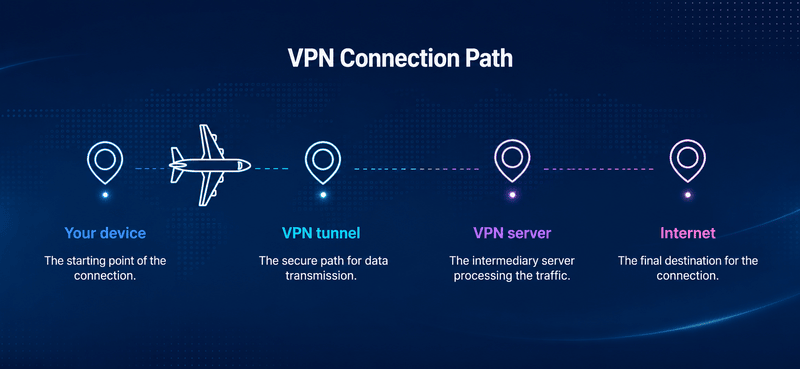
Your public IP appears to websites as the VPN server’s IP address.
Now imagine the VPN tunnel fails. Without additional protection, your device may switch to:
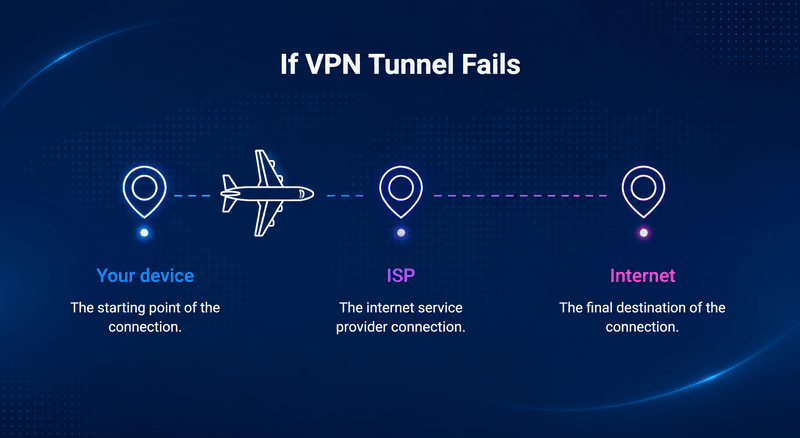
Your connection still works, but the VPN is no longer protecting it.
Websites you contact may now receive your normal public IP address. Depending on your device and network configuration, DNS requests and other connection information may also travel outside the VPN.
This is exactly what a kill switch is intended to prevent.
You can learn more about this process in our guide to what happens when a VPN connection drops.
Does all your internet traffic suddenly become readable?
No.
This is an important distinction.
If you are visiting an HTTPS website, HTTPS still encrypts the connection between your browser and that website. Losing your VPN does not automatically turn HTTPS into an unencrypted connection.
What you lose is the privacy layer provided by the VPN.
Your real public IP may become visible to websites, and your ISP can once again observe information about the connections coming from your network. DNS traffic may also become exposed if it is no longer being sent through protected DNS infrastructure.
A VPN kill switch therefore protects against VPN tunnel failure. It is not a replacement for HTTPS or other security technologies.
How Does a VPN Kill Switch Work?
The exact implementation varies between VPN applications and operating systems, but the basic process is straightforward.
1. You Connect to the VPN
The VPN creates a virtual network interface or encrypted tunnel and routes protected traffic through it.
Websites normally see the VPN server’s public IP instead of your normal public IP.
2. The VPN Monitors the Connection
The VPN application keeps track of whether its tunnel is available.
A connection can fail because of a network change, VPN server problem, software crash, device sleep event, or another interruption.
3. The Kill Switch Detects the Failure
If the secure tunnel disappears, the kill switch applies network restrictions.
Many implementations use operating-system networking controls, firewall rules, filtering systems, or routing rules to prevent traffic from falling back to the normal network.
4. Internet Traffic Is Blocked
Your browser, applications, and background services can no longer send traffic through the unprotected connection.
Instead of:
VPN fails → normal internet continues
You get:
VPN fails → internet traffic stops
5. The VPN Reconnects
Many VPN apps automatically attempt to reconnect.
Once the protected tunnel is working again, the blocking rules are removed or adjusted and internet access resumes.
You may never notice the interruption beyond a page briefly refusing to load.
Why Do VPN Connections Drop?
Even a good VPN connection can occasionally be interrupted.
Common causes include:
- Moving between Wi-Fi networks
- Switching between Wi-Fi and mobile data
- Unstable internet connections
- A VPN server becoming unavailable
- Your computer waking from sleep
- Your phone moving between cellular towers or networks
- Restarting or changing a network adapter
- VPN application crashes
- Operating-system updates or reboots
- Temporary protocol or handshake failures
- Restrictive public Wi-Fi networks
A dropped VPN does not necessarily mean the VPN provider is unreliable. Modern devices regularly change network states.
The important question is what happens during that transition.
A good kill switch should prevent your normal internet connection from taking over before the VPN protection returns.
What Does a VPN Kill Switch Protect?
The main job of a kill switch is preventing traffic from escaping the VPN tunnel when the tunnel fails.
That can help protect several things.
Your Real Public IP Address
Websites normally see your VPN server’s IP while you are connected.
If the VPN disappears and normal internet traffic resumes, a website or online service may receive your ISP-assigned public IP instead.
A kill switch blocks the connection before this fallback can happen.
DNS Activity
DNS translates names such as example.com into IP addresses that computers can use.
VPNs often route DNS requests through their own protected infrastructure.
If your VPN disconnects incorrectly, DNS requests may potentially fall back to another resolver.
A properly implemented kill switch can help prevent those requests from leaving while the VPN is unavailable.
For more information, see our guide to preventing DNS leaks while using a VPN.
Background Applications
Not all network activity happens inside your browser.
Cloud-sync software, messaging applications, torrent clients, game launchers, email applications, operating-system services, and other software can continue communicating in the background.
A system-wide kill switch can block those connections when the VPN tunnel disappears.
P2P Connections
A kill switch is particularly useful for applications that maintain continuous network connections.
If a VPN disappears during a P2P session, the application may otherwise continue using the normal internet connection.
Blocking that fallback reduces the risk of an unintended IP exposure.
What a VPN Kill Switch Does NOT Protect Against
A kill switch is useful, but it should not be treated as a complete privacy system.
It does not make you anonymous.
It also does not automatically protect you against:
- Malware
- Phishing
- Malicious downloads
- Tracking while logged into online accounts
- Browser fingerprinting
- Cookies
- Weak passwords
- Data breaches
- Every possible DNS, IPv6, or WebRTC leak
- Problems that occur while the VPN appears to remain connected
- A VPN provider logging activity
For example, if you sign in to your Google account while using a VPN, Google still knows which account is signed in.
Similarly, a kill switch does not replace dedicated DNS, IPv6, or browser leak protection.
Think of it as one layer in your VPN’s overall privacy system.
Types of VPN Kill Switches
VPN providers use several names for kill-switch technology, including Network Lock, Firewall Mode, Lockdown Mode, and Internet Kill Switch.
There are also two different ways to classify them: by when they activate and by what they block.
Standard Kill Switch
A standard or reactive kill switch activates when an established VPN connection fails unexpectedly.
For example:
VPN connected → connection unexpectedly drops → internet blocked
Depending on the VPN, deliberately pressing the Disconnect button may not trigger this type of kill switch.
This option is usually convenient for everyday users because they can intentionally disconnect from their VPN and continue using the internet normally.
Permanent or Lockdown Kill Switch
A permanent kill switch is stricter.
Internet access is allowed only when the VPN is connected.
The basic rule becomes:
No VPN = no internet
Some implementations can remain active even after the VPN application is closed or the computer is restarted.
This is useful when preventing accidental non-VPN traffic matters more than convenience.
System-Wide Kill Switch
A system-wide kill switch blocks network traffic for the entire device.
That can include your:
- Browser
- Torrent client
- Email software
- Messaging apps
- Cloud services
- Background processes
For strong default protection, this is usually the simplest option.
App-Level Kill Switch
An app-level kill switch applies protection only to selected applications.
For example, you might configure it to block a torrent client if the VPN disappears while allowing another application to continue using your normal connection.
This offers more flexibility, although the behavior depends heavily on the VPN application and operating system.
Kill-Switch Types Compared
| Type | What Happens When VPN Fails? | Best For |
|---|---|---|
| Standard kill switch | Blocks traffic after an unexpected VPN failure | Everyday VPN use |
| Permanent/lockdown mode | Blocks internet whenever VPN is not connected | Maximum privacy |
| System-wide | Blocks network access across the device | Simple, strong protection |
| App-level | Blocks selected applications | Users who need flexibility |
VPN Kill Switch vs. Auto-Connect
A kill switch and auto-connect solve different problems. Auto-connect attempts to reconnect you to the VPN when the connection disappears.
Kill switch prevents traffic from escaping while the VPN is unavailable.
Ideally, they work together:
VPN fails → kill switch blocks traffic → auto-connect restores VPN → traffic resumes
Auto-connect alone is not the same as a kill switch.
There may still be a period between losing the tunnel and reconnecting where normal traffic could leave the device.
VPN Kill Switch vs. Always-On VPN
The terms are sometimes used interchangeably, but they are not always identical. An always-on VPN is designed to keep the VPN service continuously active.
A kill switch controls what happens when protected connectivity is unavailable.
Android provides an especially clear example. Modern Android versions support Always-on VPN along with an option called Block connections without VPN.
When both are enabled, Android can prevent traffic from using another network while the required VPN is unavailable.
This is similar to a permanent kill-switch configuration.
VPN Kill Switch vs. Split Tunneling
Split tunneling deliberately allows some traffic to bypass the VPN.
For example:
Browser → VPN
while:
Banking app → normal connection
A kill switch tries to prevent protected traffic from unexpectedly bypassing the VPN.
Because those two features control routing in different ways, they can sometimes conflict.
Some VPN applications allow them to work together. Others restrict certain combinations, and behavior may differ between Windows, macOS, Android, Linux, and iOS.
If you rely on both features, test their behavior rather than assuming the settings work exactly as expected.
Should You Always Turn On a VPN Kill Switch?
For most people who use a VPN for privacy, yes.
There is usually little reason to allow your device to silently return to its normal internet connection after an unexpected VPN failure.
A kill switch becomes especially valuable if you:
- Regularly use public Wi-Fi
- Use P2P applications
- Work with sensitive information
- Leave downloads running unattended
- Travel frequently between networks
- Depend on a VPN in a restrictive network environment
- Want to prevent accidental IP exposure
For ordinary daily browsing, a standard kill switch usually provides a good balance between privacy and convenience.
People with stricter privacy requirements may prefer a permanent or lockdown-style configuration.
Are There Any Downsides to Using a Kill Switch?
The biggest downside is exactly what the feature is supposed to do:
your internet stops working.
That can occasionally be confusing.
If your VPN cannot reconnect, websites and applications may appear broken even though your Wi-Fi connection is fine.
A strict kill switch can also interfere with:
- Local printers
- Network-attached storage
- Smart-home devices
- Local network services
- Captive portals on hotel or airport Wi-Fi
- Split tunneling
Whether these problems occur depends on how the VPN implements its kill switch.
If your internet works when the kill switch is disabled but stops when it is enabled, check the VPN connection before troubleshooting your router or ISP.
Do All VPNs Have a Kill Switch?
No.
Feature availability varies between VPN providers, subscription plans, applications, and operating systems.
Even when a provider advertises a kill switch, you should check whether it exists on the device you actually use.
A Windows application may behave differently from the same provider’s Android, macOS, Linux, or iOS app.
Implementation also matters.
A feature being called a “kill switch” does not automatically tell you how it behaves during:
- VPN application crashes
- Reboots
- Sleep and wake cycles
- Network changes
- Server switching
- Manual disconnections
- Split tunneling
For that reason, VPNPick recommends checking both feature availability and real-world behavior.
How to Check Whether Your VPN Kill Switch Works
Testing your kill switch is better than simply assuming it works. However, the test needs to simulate the right problem.
Simply turning Wi-Fi off is not enough. Your internet would stop even if you did not have a kill switch.
Instead, you want to see whether your device can send traffic through its normal connection after the VPN tunnel disappears.
Step 1: Find Your Normal IP Address
Disconnect the VPN temporarily and use a trusted IP-checking service.
Record the public IP address shown.
You do not need to record the full address permanently. You simply need to recognize whether your normal IP returns during testing.
Step 2: Connect to Your VPN
Connect to a VPN server and check your IP again.
You should now see the VPN server’s address rather than your normal public IP.
Step 3: Enable the Kill Switch
Open your VPN application’s security or connection settings.
Look for a setting named something similar to:
- Kill Switch
- Internet Kill Switch
- Network Lock
- Firewall
- Lockdown Mode
Enable it.
Step 4: Simulate a VPN Failure
The exact method depends on your operating system and VPN.
Possible tests include changing networks while the VPN is connected, temporarily interrupting the VPN process, or testing the connection after sleep and wake.
Advanced testing can also examine what happens when the VPN application crashes or the computer reboots.
Step 5: Try to Access the Internet While the Tunnel Is Unavailable
While the VPN connection is down but your normal internet connection is available, try loading a new webpage.
A system-wide kill switch should prevent the page from loading through your normal connection.
If the page loads and shows your normal public IP, the protection did not behave as expected.
Step 6: Reconnect the VPN
Restore the VPN connection.
Verify that internet access returns and check your IP address again before continuing normally.
Important: Test every device separately. A VPN provider’s kill switch may behave differently on Windows, macOS, Android, Linux, and iOS.
What If Your Internet Stops Working After Closing the VPN?
This is one of the most common signs that a strict kill switch or lockdown mode is still active.
Your Wi-Fi may show that it is connected, but the kill switch is deliberately blocking internet traffic because no VPN tunnel is available.
Try:
- Opening your VPN application.
- Reconnecting to a VPN server.
- Checking whether Kill Switch, Lockdown Mode, Network Lock, or a similar setting is enabled.
- Disabling that setting only if you intentionally want to use the internet without the VPN.
If you configured firewall rules manually, those rules may also remain active after the VPN application closes.
Advanced Windows users can read our guide to creating a custom VPN kill switch on Windows.
How to Choose a VPN With a Good Kill Switch
Do not judge the feature only by whether the words “kill switch” appear on a VPN’s feature page.
Check how it behaves.
A strong implementation should clearly explain:
- Which operating systems are supported
- Whether protection is system-wide or app-specific
- How it works with split tunneling
- Whether it activates after an accidental disconnect
- Whether manual disconnects are treated differently
- Whether protection survives a reboot
- Whether local-network traffic can still work
- Whether it automatically reconnects
- Whether the feature is enabled by default
Most importantly, test it yourself on the device that matters to you.
Privacy features are useful only when they behave as expected.
Is a VPN Worth Using Without a Kill Switch?
A VPN can still encrypt traffic and hide your normal public IP while the VPN connection is working.
So a VPN without a kill switch is not automatically useless.
The problem appears when the tunnel fails.
If your device immediately returns to its normal internet connection, applications may continue communicating without the VPN.
For occasional streaming or low-risk browsing, some users may accept that risk.
For privacy-sensitive activity, we strongly recommend a VPN with a reliable kill switch.
Frequently Asked Questions
Should my VPN kill switch be on or off?
For most privacy-focused users, it should be on. A standard kill switch provides protection during unexpected VPN failures without requiring your VPN to remain connected permanently.
Does a VPN kill switch slow down the internet?
A kill switch normally does not route your traffic through an additional server, so it should not significantly affect VPN speed during normal operation. Its main job is controlling whether traffic is allowed when the VPN connection is unavailable.
Why does my internet stop when I disconnect my VPN?
You may have a permanent kill switch, lockdown mode, or operating-system setting that blocks connections without a VPN. Reconnect the VPN or change the kill-switch setting if you intentionally want to use your regular internet connection.
Does a VPN kill switch prevent DNS leaks?
It can help prevent DNS requests from escaping during a VPN disconnect, but it should not be treated as a complete replacement for dedicated DNS leak protection. DNS configuration, operating-system behavior, and VPN implementation still matter.
Does a VPN kill switch work on phones?
Yes, many mobile VPN applications provide kill-switch-style protection. Implementation differs by operating system. Android, for example, supports Always-on VPN and a system setting that can block connections that do not use the VPN.
Is a kill switch the same as a firewall?
No. Some VPN kill switches use firewall or packet-filtering rules to enforce blocking, but a firewall is a much broader network-security technology. The kill switch is a specific VPN safety function.
Is a VPN kill switch necessary for torrenting?
It is strongly recommended when privacy matters. Torrent and P2P applications may maintain network connections continuously, so a VPN failure could otherwise allow the application to continue communicating through your normal internet connection.
Can a VPN kill switch fail?
Yes. Implementation quality varies, and behavior can change depending on operating system, application crashes, network changes, reboots, and other conditions. That is why testing the feature on your own device is important.
The Conclusion
A VPN kill switch solves one simple but important problem:
What happens when your VPN stops protecting you?
Without one, your device may quietly return to its normal internet connection. With a properly working kill switch, traffic is blocked until the protected connection returns.
For most VPN users, enabling a kill switch is an easy privacy improvement. For people who rely heavily on VPN protection, a permanent or lockdown-style kill switch can provide an even stricter safeguard.
Just remember that seeing “kill switch” on a VPN’s feature list is not enough.
Check how it works on your operating system, understand what it blocks, and test it before relying on it.