

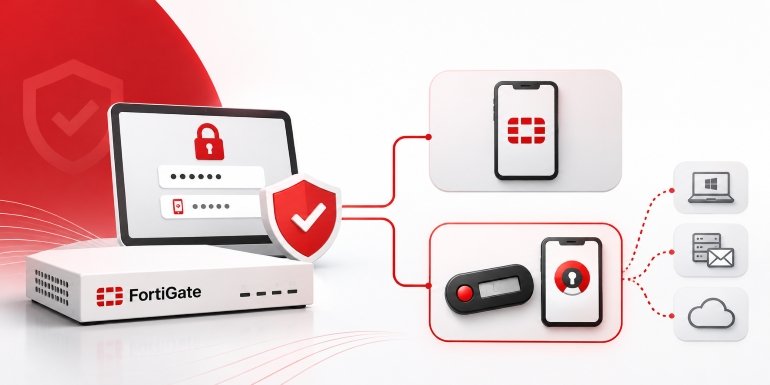
For many organizations, Fortinet’s FortiToken is the natural starting point. It integrates with the Fortinet ecosystem and offers a relatively straightforward way to add a second authentication factor.
However, FortiToken isn’t the only way to secure FortiGate access. Depending on the size of an organization and its long-term security requirements, a third-party MFA solution may offer greater flexibility and a different licensing structure.
The main difference comes down to how authentication is managed. FortiToken keeps authentication closely connected to Fortinet’s infrastructure, while third-party solutions can use the standard RADIUS protocol to provide MFA across multiple devices and platforms.
Neither approach is automatically better. The right choice depends on the environment being protected, the number of devices involved, and how an organization plans to manage authentication as its infrastructure grows.
FortiToken vs. Third-Party MFA: What’s the Difference?
Before looking at the technical details, it helps to understand how the two approaches compare.
| Comparison Factor | FortiToken | Third-Party MFA Through RADIUS |
|---|---|---|
| Licensing | Token licenses tied to FortiGate or FortiAuthenticator | Generally licensed per user, independently of the appliance |
| Multiple Devices | FortiAuthenticator provides centralized authentication | One MFA/RADIUS layer can support multiple compatible devices |
| Multiple FortiGate Units | FortiAuthenticator is typically used for centralized deployment | The same RADIUS proxy can serve multiple units |
| Non-Fortinet Devices | FortiAuthenticator can extend authentication to third-party RADIUS clients | Can support RADIUS and other systems through dedicated integrations |
| Hardware Tokens | Fortinet’s token catalog | Multiple OATH-compliant hardware token vendors |
| Token Reassignment | Fixed-seed FortiToken options | Reprogrammable OATH tokens are available |
| Vendor Dependency | Authentication remains centered on Fortinet | Vendor-neutral authentication architecture |
| Offline Environments | Requires a CD-activated variant | Can operate without a cloud dependency |
| Integration | Fortinet-centered infrastructure | Central MFA platform with RADIUS and application-specific integrations |
| Potential Coverage | Network access and supported SAML/identity integrations | VPNs, network devices, Windows/RDP, OWA/EAC, ADFS, web applications, and other supported systems |
Understanding Fortinet’s FortiToken Options
Fortinet offers three main components for MFA: FortiToken Mobile, FortiToken hardware devices, and FortiAuthenticator.
FortiToken Mobile is a software-based authentication application that generates time-based one-time passwords (TOTP). It is OATH-compliant and licensed per user. However, its licensing is tied to a specific FortiGate appliance.
For licenses issued after August 2025, registration does not automatically transfer to a replacement appliance, except in qualifying return merchandise authorization (RMA) situations.
The cost can also become significant as the number of users increases. Based on published reseller pricing, a 100-user FortiToken Mobile bundle costs approximately $7,638, or around $76 per user as a one-time expense.
Fortinet also offers physical authentication devices. Its current hardware token models include the 210, 410, and 310 series, while the older 200B model has been discontinued.
These hardware tokens follow a similar per-appliance licensing approach and are activated through Fortinet’s FortiGuard cloud service. Organizations operating in environments without access to FortiGuard can consider the CD-activated variant.
FortiAuthenticator becomes particularly relevant when an organization operates multiple FortiGate appliances.
It provides a centralized authentication layer for managing FortiToken across the environment. Without it, a FortiToken Mobile license registered to one FortiGate cannot simply be used to authenticate against another FortiGate.
This introduces an additional infrastructure requirement. Organizations must deploy and maintain a separate physical or virtual appliance, including its updates, backups, and ongoing administration.
For a small deployment, this may not be a significant concern. For a larger environment, however, the additional infrastructure and licensing deserve consideration.
Where the Native Architecture Becomes More Complex
FortiToken isn’t limited to Fortinet devices.
With FortiAuthenticator configured as a RADIUS server, organizations can extend FortiToken-based authentication to compatible third-party systems. This allows other RADIUS-capable devices to use the same authentication infrastructure.
However, doing so requires another Fortinet component to deploy, license, and maintain.
The difference becomes clearer when an organization needs to protect systems that don’t rely on RADIUS.
A vendor-neutral MFA platform can provide a centralized authentication layer across RADIUS-compatible infrastructure and other systems through dedicated integrations. Depending on the platform, this can include VPN connections, Windows and Remote Desktop Protocol (RDP) logins, Outlook Web App (OWA), Exchange Control Panel (EAC), Active Directory Federation Services (ADFS), and web applications.
Instead of building authentication around a particular firewall vendor, organizations can manage access across different systems through one MFA platform.
Using Third-Party OATH Tokens With FortiGate
One practical alternative is to connect FortiGate to a third-party MFA solution through RADIUS.
RADIUS (Remote Authentication Dial-In User Service) is a standard protocol that allows network devices to communicate with an external authentication server. FortiGate already supports it, making it possible to introduce another MFA layer without replacing the existing firewall.
For example, MFA for FortiGate can be implemented through a RADIUS proxy positioned between FortiGate and the organization’s existing directory service, such as Active Directory or LDAP.
The authentication process is relatively straightforward:
- A user attempts to access a FortiGate-protected service.
- FortiGate forwards the authentication request to the configured RADIUS proxy.
- The proxy communicates with the existing directory service to validate the user’s credentials.
- The MFA system verifies the additional authentication factor.
- Access is granted or denied based on the authentication result.
This approach allows organizations to introduce third-party MFA without registering individual tokens against each FortiGate appliance.
Configuring FortiGate for this setup requires only a few adjustments. Administrators need to add the external MFA proxy as a RADIUS authentication server through User & Authentication and RADIUS Servers, choose PAP as the authentication protocol, and configure a shared secret that matches the credentials set on the proxy.
One setting deserves particular attention: the RADIUS timeout.
FortiGate’s default timeout is approximately five seconds. That’s often sufficient for standard password authentication, but users may need additional time to retrieve and enter a one-time password.
Increasing the timeout to 30 seconds (at least ) can help prevent authentication failures during testing and deployment.
The next step is to establish a user group linked to the RADIUS server for remote authentication. Administrators can then assign this group to relevant SSL VPN portals or FortiGate administrative profiles to enforce MFA for the selected users.
The result is an additional authentication layer without requiring a firmware change or separate FortiGuard license activation.
Protecting More Than VPN Connections
MFA shouldn’t stop at the VPN login screen.
A RADIUS-based integration can extend authentication protection to several FortiGate access points, including:
- SSL VPN, covering both the web portal and FortiClient tunnel mode.
- IPsec configurations using XAuth or EAP with RADIUS.
- FortiGate administrative login through the web GUI.
- SSH access to the FortiGate command-line interface.
Administrative access deserves particular attention. A super-admin account can make configuration changes across the entire firewall, making it a much more valuable target than an individual VPN account.
It’s therefore important to include administrator authentication in an MFA deployment rather than focusing exclusively on remote employee access.
The experience for FortiClient users can remain familiar. Once the primary password is accepted, FortiGate sends a RADIUS Access-Challenge, and FortiClient automatically presents a field for the secondary one-time password. No additional client-side configuration is required.
For deployments where Access-Challenge isn’t fully compatible, administrators can use an alternative authentication method.
In inline authentication mode, users enter their PW (password) and OTP together in a single field, separated by a delimiter such as a comma. The RADIUS proxy then separates and validates the two values.
This provides another way to accommodate different authentication environments without changing the overall deployment approach.
Where Third-Party MFA Offers More Flexibility
The biggest advantage of vendor-neutral MFA becomes apparent when an organization operates network equipment from different manufacturers.
Consider an organization with FortiGate at its main office, Cisco ASA at another location, Palo Alto GlobalProtect inherited through an acquisition, and a SonicWall firewall at a branch office.
Managing separate MFA systems for each environment can introduce unnecessary complexity.
A RADIUS-compatible MFA platform provides another option. Any device supporting the RADIUS protocol under RFC 2865 can be configured to communicate with the same RADIUS proxy.
Users can enroll once and authenticate through the same MFA platform, regardless of which supported network gateway they use.
FortiAuthenticator can also extend FortiToken authentication to third-party RADIUS clients. However, a vendor-neutral MFA platform offers flexibility beyond network equipment.
Through dedicated integrations, the same authentication server can also protect Windows and RDP logins, OWA and EAC, ADFS, and supported web applications.
For managed service providers (MSPs) and enterprises with mixed infrastructure, this can simplify authentication management considerably.
Rather than maintaining separate authentication systems for different vendors, administrators can manage multiple access points through one centralized MFA platform.
More Hardware Token Choices Without Appliance Restrictions
Hardware token flexibility is another important consideration.
FortiToken hardware devices are tied to Fortinet’s licensing ecosystem. This can become restrictive when an organization wants to standardize authentication hardware across multiple FortiGate appliances or use token models outside Fortinet’s catalog.
A vendor-neutral MFA platform can support a broader selection of OATH-compliant hardware tokens, depending on the platform’s compatibility.
These may include TOTP, HOTP, and OCRA devices from different manufacturers.
Some programmable hardware tokens offer an additional advantage: they can be wiped and assigned a new authentication seed before being issued to another employee.
This can make a difference in organizations with regular staff turnover.
Instead of permanently retiring a physical token when an employee leaves, an administrator can provision a new seed and reassign the device to another user.
The same centrally managed token inventory can then support multiple parts of the organization, including RADIUS-protected network infrastructure and non-RADIUS systems covered through dedicated integrations.
For businesses managing a large number of employees and authentication devices, this can provide more flexibility throughout the token lifecycle.
Which MFA Approach Makes More Sense?
The decision ultimately depends on the organization’s infrastructure and operational requirements.
FortiToken remains a practical choice for organizations with a single FortiGate appliance, a stable user base equipped with smartphones, and reliable FortiGuard cloud connectivity for activation.
In this situation, the native solution offers a relatively straightforward deployment. Switching to a third-party platform may introduce additional complexity without providing enough practical benefit.
The calculation changes when the environment becomes more complicated.
A third-party MFA platform may be worth considering when an organization:
- Operates multiple FortiGate appliances and needs centralized authentication.
- Uses network equipment from different manufacturers.
- Needs to protect both RADIUS and non-RADIUS access points.
- Requires hardware token options beyond Fortinet’s catalog.
- Operates in an air-gapped environment without cloud connectivity.
- Wants an authentication architecture that isn’t dependent on a single network vendor.
In these situations, a vendor-neutral platform can provide one centralized MFA layer across different devices, protocols, and access points.
The goal is to determine whether the current authentication architecture remains practical as the organization’s security requirements evolve.
Compliance and Cyber Insurance Don’t Usually Require a Specific MFA Vendor
Compliance requirements are another reason organizations introduce MFA for FortiGate.
However, the major frameworks generally focus on the security outcome rather than requiring a particular authentication vendor.
Under PCI DSS v4.0 Requirement 8.4.3, organizations must enforce MFA for remote access to the CDE (cardholder data environment) from outside their internal network. This requirement is particularly relevant to FortiGate SSL VPN alongside IPsec deployments that provide remote access to systems handling payment information.
Similarly, NIST SP 800-63B’s AAL2 requirements call for two distinct authentication factors without mandating a specific MFA product.
Cyber insurance requirements have also moved in the same direction. MFA for remote access is now a standard pre-binding requirement for many policies, and insurance questionnaires commonly focus on whether MFA is enforced rather than which vendor provides it.
This gives organizations flexibility when selecting their authentication infrastructure.
Whether they choose FortiToken or a third-party platform, the important consideration is whether the solution meets the applicable security and compliance requirements.
Licensing costs, infrastructure requirements, and long-term flexibility can then help determine which option makes the most sense.
MFA Doesn’t Replace the Need to Patch FortiOS
There is one final security consideration that applies regardless of which MFA solution an organization selects: keeping FortiOS updated.
FortiGate has faced several serious security vulnerabilities over the years, including CVE-2022-42475, CVE-2023-27997, and CVE-2024-21762. Other vulnerabilities, including CVE-2024-55591 and CVE-2025-24472, have also created significant concerns because remote attackers can potentially gain super-admin privileges through authentication bypass.
MFA cannot prevent every vulnerability from being exploited. Some vulnerabilities can allow attackers to execute code or gain administrative access before a second-factor authentication prompt is ever presented.
There is also a separate threat involving exposed management interfaces and weak credentials.
In early 2026, Amazon’s threat intelligence team documented a campaign that compromised more than 600 FortiGate devices across more than 55 countries. The campaign targeted internet-exposed management interfaces and weak credentials, with no FortiGate vulnerability exploitation observed.
These incidents highlight two different security problems.
Patching protects against known software vulnerabilities. MFA adds another layer of protection against compromised credentials.
Neither replaces the other.
Organizations should therefore treat firmware updates and MFA enforcement as separate, essential parts of their FortiGate security strategy, regardless of which authentication provider they ultimately choose.
The Bottom Line
FortiToken remains a sensible MFA solution for organizations that operate primarily within the Fortinet ecosystem and want a straightforward authentication deployment.
However, organizations with multiple firewalls, mixed-vendor infrastructure, specialized hardware token requirements, or a need to protect additional systems may benefit from looking beyond the native solution.
RADIUS-based third-party MFA provides a way to extend authentication across compatible network devices, while dedicated integrations can bring other systems under the same centralized authentication platform.
Ultimately, the best approach is determined by how effectively the solution protects the organization’s access points and supports its long-term security requirements.